How To Plan A Website - SEO Experiment using a 6 year old webpage and applying new social networking techniques


Subscribe to my RSS feed

How To Plan A Website - SEO Experiment

In my website statistics today (19th May, 2010) I noticed the keyword phrase "how to plan a website" - so I popped over to the page and thought it was great that it had been found in the search engine results pages (SERPS) I decide to do an SEO Experiment and share it with you :-)

This was one of the keyword phrases people were typing into the search engines to find one of my pages. I click on the link which took me to Google and showed me at the top of Page 2, which isn't too bad, but I got to thinking ...

It's a long time since I wrote that page, maybe 5 years ago (2005?), and I now know so much more about SEO (Search Engine Optimization). I decided to give myself a little challenge ... I'd like to see if I could make a few changes and bring this page into the first page of results on Google. You might like to follow along and see how I'm doing :-)


19th May 2010

  • Google Page Rank = 3
  • Incoming Google Links = 0 (oh dear! I didn't know about linking strategies way back when)
  • Alexa Rank for site = 421,222
  • Age of website = Dec 2004
  • you can see all this info in the second image below, underneath the info about my website
  • I'm using Firefox and the SEO Quake plugin to see this info when I do searches.

How to Plan A Website - SEO Experiment with Teena Hughes

Above: this is what people typed into Google - that's right, 362 MILLION results!!
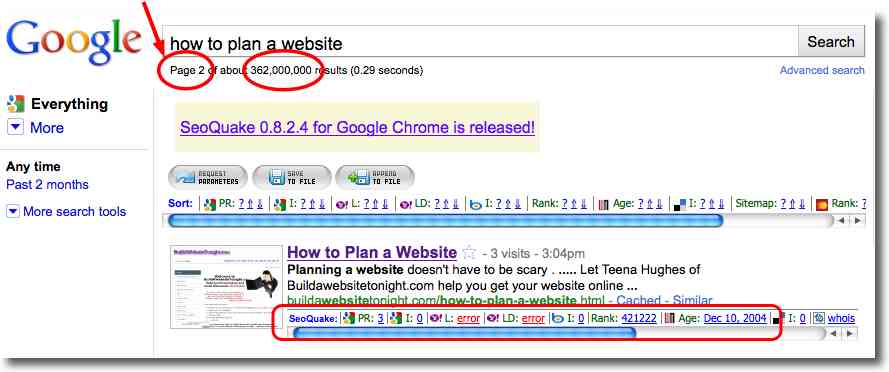
 

How to Plan A Website - SEO Experiment - page 2 - with Teena Hughes


Above: here's my website, at the top of Page 2 - oh so close to being on Page 1 of the search engine results page!


I have a few ideas on what I can do to increase the SEO for this webpage:

  • check the Meta Tags - Title, Description, Keywords
  • check the Image url and tags
  • decide on a strategy to create incoming links from other popular websites

That's enough to get started - I'll let you know what I do and the changes which occur - fingers' crossed!

I'll be writing about my updates in the YOUR BIZ HOT TIPS Newsletter, so if you sign up you'll be notified.

PS - if you'd like to leave a Comment, offer a word of encouragement :-) etc, tell me about your efforts to do something similar, I'd love to hear from you can - simply do so below this article where it says ADD A COMMENT.

UPDATE: 28th June 2011

OK - I admit it - I got sidetracked last year and never followed through on my SEO experiment.

Today I decided to see how this page was faring, and so I searched for HOW TO PLAN A WEBSITE in Google to see where (or if) it is listed ... I discovered my web page now appears on Page 4 of the Google Search Results Pages (SERPS). This may sound like my poor little webpage is slipping down the ranks, but when I looked at how MANY results there are now, I didn't feel so bad :-)

There are over a BILLION pages with those 5 words on them - that means the number of pages has almost quadrupled (multiplied by almost 4!) in only one year! :

How to Plan A Website - Page 4 of over a billion results

Wow! So the competition is fierce for these 5 words - how to plan a website

In the image below my web page is listed on page 4 of the SERPS:

How To Build A Website with Teena Hughes

So I've decided to have another go at this - and considering how there is no actual SEO on the original page created about 6 years ago, I thought I'd list what's currently there, and what I can change:

  1. the 5 words - how to plan a website - appear in the web page URL/link

  2. On Page:  the 5 words - how to plan a website - appear in the breadcrumb menu

  3. On Page:  the 5 words - how to plan a website - appear in the H1 main title at the top of the page

  4. Behind the scenes HTML:  the 5 words - how to plan a website - appear in meta tags - Title, Description (but not Keywords), in the Breadcrumb, and H1 heading.

What this tells me is that I should REALLY be able to improve the position of this page by performing a few simple on-page and off-page SEO techniques.

Hot Tip! Now is as good a time as any to let you know that if you have pages on your websites which do NOT have any SEO LOVE in them (because you didn't know how or what to do when you created them), that you can definitely go BACK to those pages and give them some love, and get some "Google juice" - help them to rise in the Search Engine Results!

Day 1 SEO Experiment

Steps to take as at 2:00pm on 28th June 2011 (Sydney time)

  1. the easiest step can be done first - use hyperlinking between internal webpages - for example, link from THIS page to the page in question (done! I also made the keyword phrase - the "anchor text" - bold, for extra SEO pizzazz)
  2. get an independent witness to verify my current position in the SERPS

  3. add more mentions of my "long-tail keyword" (keyword which is more than 2 words long - read more on my What Is SEO page) into the page in a natural manner (without overdoing it)
  4. rename images to include the 5 word "long tail keyword phrase" of -- how to plan a website

  5. rewrite the image Alt tags (which appear in the html)

  6. create a couple of incoming links to the page by posting the URL on social bookmarking and social media sites.

What I've done

  • 2:00pm - I hyperlinked the keyword phrase - how to plan a website - 7 times on this page, linking to the page how-to-plan-a-website.html
  • 2:30pm - I created a new image to appear at the top of the page, I named it using the keyword phrase (and "Teena's Recipe"), and uploaded it to the page
  • 2:45pm - I uploaded the image to my Facebook page (http://Facebook.com/buildawebsitetonight), then Commented on it and placed the url back to the page
  • 3:00pm - I looked at the 3 images which have been on that page for 5+ years, and decided to rename the images using the keywords. Here's the information BEFORE I made changes:

    How to plan a website - SEO experiment on Image 01


Tomorrow I'll upload the new images.

Day 2 SEO Experiment

5:00pm on 29th June 2011 (Sydney time)


After making those simple changes yesterday, my web page has climbed from postion 36 to position 32!

Excellent result!

Today I'm going to make a few more changes for ON-PAGE SEO:

  1. I reduced the length of the Meta Description, and made sure the keyword phrase was in a prominent position.

  2. I couldn't believe I'd done this - I hadn't put the keyword phrase in the Meta Keyword Tags, so I have now added it in a prominent position.

  3. The 3 main images on the page were renamed yesterday, so today I uploaded the new images and made sure their ALT/Description tags use the keyword phrase.

  4. Today I'm going to write a blog post summary of the page, which will be automatically sent to Twitter, Facebook and many other pinging sites online. This is done with a view to creating backlinks back to the page (currently ther are NO backlinks for this page in Google's results). View the image below to see the ZERO BACKLINKS in Google.

    The How to plan a website page has ZERO / no backlinks in Google as at 29th July 2011

  5. 6:45pm - Sent an email summary to Posterous.com. 10 minutes later I searched Google for the main page url, and discovered that the Posterous page had already been indexed! Fabulous!

    How to plan a website - Posterous summary indexed in 10 minutes

That's it for today!

What next?

I'll let you know what I do and the changes which occur - fingers' crossed this web page's position will improve in the search engine resuls (SERPS)!

I'll be writing about my updates in the YOUR BIZ HOT TIPS Newsletter, so if you sign up you'll be notified.

Update on How to Plan A Website - 23rd October 2011

It's been a few months since my initial small changes, and today I am pleased to report that my website page - How To Plan A Website - appears :

  • in Position #7 on Page #1 in the Google SERPs

  • from "about 1,620,000,000" results (that's ONE BILLION, 620 Million website pages!)

  • and a blog post I wrote about How To Plan A Website appears as Position #11, which for some reason is showing at the bottom of Page 1 rather than Page 2).

I'm trying a new direction - I have a great feature in my business blog (which uses Wordpress.org technology) which helps me see which of the SEO tweaks have yet to be done - and I want to try a new experiment today.

I copy/pasted my live page into the blog to test it, and the results are not good - a score of 5 out of 10.

How to plan a website before SEO tweaks

The GREAT NEWS is that I can improve on this simply by following the suggestions - so that's what I'm doing today :-) Here is the result:

How to plan a website - my SEO score

I can certainly add more versions of my keyword phrase - how to plan a website - into the text of the page, and boost the density, but only if it sounds NATURAL (which is where many folks go overboard).

I'll post an update on any improvements shortly. Fingers' crossed!

PS - I have looked at the site which appears in Position #1 on the SERPS for this keyword, and guess what? The page result only shows ONE INSTANCE of the keyword phrase ... so, can anyone tell me WHY Google would give this page as an answer to my query?

To look at it from another angle, I am going to search for the phrase with inverted commas/speech marks around it, to see which position I have for EXACT PHRASE MATCH:

  • my website appears in Position #3 on Page 1 of SERPs

  • my blog review appears in Position #6 on Page 1 of SERPs

How to plan a website SERPS Position 3 Page 1

People rarely search for 'exact phrase match', but it's fantastic to know how well my page is doing :-)

---------------

PS - if you'd like to leave a Comment, offer a word of encouragement (pretty please?) :-) etc, tell me about your efforts to do something similar, I'd love to hear from you can - please ADD A COMMENT in any of the following ways:

  • on Twitter - by using the hashtag #howtoplanawebsite http://twitter.com/build_website

  • on Facebook - http://facebook.com/buildawebsitetonight - feel free to use the same hashtag #howtoplanawebsite
  • via my Contact form on this site.

Thanks in advance!  I look forward to hearing from you :-)
Teena

Related Posts with Thumbnails

Add A Comment

Follow me on Facebook Follow me on Twitter


Hi from Sydney where it's:


Sign up for the Your Biz Hot Tips ezine today
Teaching you how to turn your website into your best friend, one step at a time!

Grab your copy of my ebook today! Type your details below to subscribe to
YOUR BIZ HOT TIPS
ezine!

Is your website missing out? Check out the 33 Top Website Tips & give your site a check-up.